
Data Modelling in Power BI with LLM

In the November 2025 Power BI update, Microsoft introduced a game-changing tool for data engineers and analysts: the Power BI Modeling MCP (Model Context Protocol) Server.
This protocol allows you to connect AI agents (like GitHub Copilot) directly to your Power BI semantic models. Instead of manually clicking through menus, you can now build, rename, and manage your models using natural language.
Here are some more details on how to use the MCP server for semantic model building based on the latest release.
Data Modelling in Power BI with MCP
The MCP server acts as a bridge between an AI agent and your data model. It exposes the metadata of your model to the AI, allowing it to "read" your current structure and "write" changes—such as creating measures or renaming columns—automatically.
Setting Up Your Environment
To get started, you need to have your tools open side-by-side:
Open Power BI Desktop: Load the .pbix file you want to work on (e.g., a file named Untitled.pbix).
Open Visual Studio Code: Ensure you have the GitHub Copilot extension installed and active.

Connecting the AI Agent to Your Local Model
Once your tools are open, you need to establish a connection between the AI agent and the local instance of Analysis Services running inside Power BI Desktop.
In VS Code, open the GitHub Copilot Chat.
Type a command to connect, for example: "Connect to 'Untitled' in Power BI Desktop"
The agent will identify the local instance and confirm once the connection is successful.

Connecting to Semantic Models in Fabric
The MCP server isn't limited to local files; it can also manage models hosted in the cloud.
In VS Code, ask the agent to connect to a specific workspace:
"Connect to the [Workspace Name] workspace and [Model Name] semantic model."
Authentication: Because this is in the cloud, the agent will prompt you to authenticate your Microsoft Fabric account.
Cross-Platform Sync: You can keep the semantic model open in a web browser side-by-side with VS Code to watch changes happen live.
Prompt and Results
Prompt 1: Create a new measure for Revenue based on Sales Price and Unit Sold.
We wanted to test if it gets the difference between SUM and SUMX. It nailed it!

Prompt 2: Create appropritate measures, format it and organise it in folder structures in a seprate table named #Measure.
We wanted to test if it can create empty table and organise the measures, it nailed it!

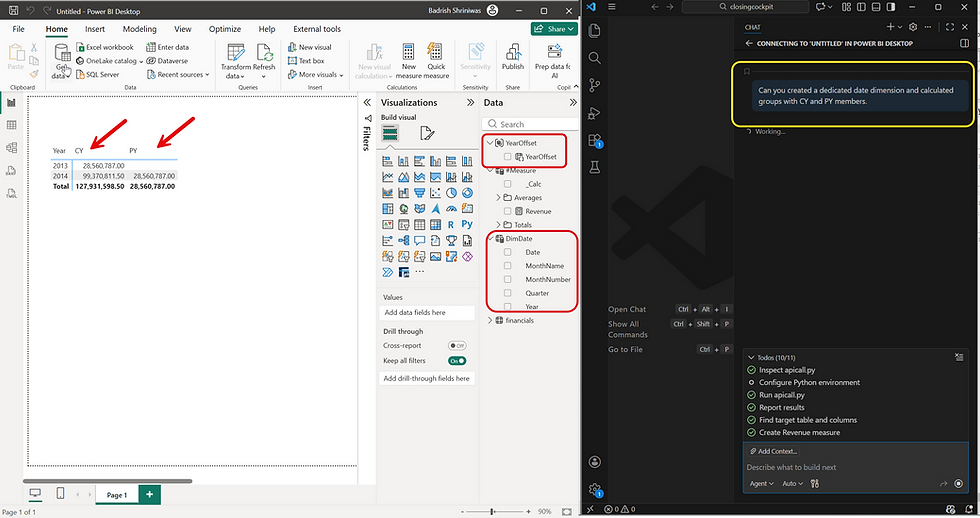
Prompt 3: Can you create a dedicated date dimension and calculated groups with CY and PY members?
We wanted to check if it gets the concept of calculated groups and time intelligence. It is nailed it although Copilot didn't create the relationship between the fact table and date dimension. We had to do it manually, such a disappointment :-)
Summary Table: MCP Server Capabilities
Feature | Benefit |
Natural Language Modeling | Build models by talking to them instead of clicking. |
Bulk Renaming | Clean up technical debt in seconds. |
TMDL Support | Perfect for developers using Git and VS Code. |
Pattern Discovery | AI learns from your existing DAX to write new DAX. |
For more details on the November 2025 update, you can watch the full video here.
Final Verdict
The Data Modelling in Power BI with MCP Server is officially yet another "Work Smarter, Not Harder" update of LLM era. We’ve officially entered the era where we can literally talk your data model into existence while sipping your morning coffee.
On the 64 million dollar question of "Should I Look for a New Job?"
Scenario | Job Description | Verdict |
Scenario A | Your job is 90% renaming columns and 10% crying over broken relationships. | Yes, look for a new job—because you’re about to be so bored you’ll start counting the ceiling tiles. |
Scenario B | You want to spend your time on high-level data strategy, complex business logic, and actual insights. | Stay put! You just got a digital intern that works for you, never complains, and knows the entire DAX documentation by heart. |
Scenario C | You’ve always wanted to tell your computer "Make this model pretty and follow the rules" and have it actually listen. | You’re already in the future. Enjoy the extra 15 hours a week you just gained. |
Don't quit your job just yet—just update your LinkedIn headline to "MCP Whisperer" and tell your boss the model took "all afternoon" while you actually caught up on your favorite show.


Comments